New Palates, New Playbook: Decoding 2025’s F&B Rules.
The global food and beverage industry is undergoing a seismic shift. Consumer values are recalibrating, technology is reshaping every touchpoint, and the definition of “health” is expanding. If you’re still operating on yesterday’s assumptions, you’re missing the future.
Our research arm, Designsensory Intelligence, has meticulously analyzed the data. The result: a sharp, clear look at where food and beverage is headed next, so you can lead, not just react.
Key shifts we uncovered:
Consumer Trust is Brittle. Only 62% of consumers trust the U.S. food supply, down sharply from 70%. Transparency in labeling, safety protocols, and sourcing isn’t optional.
Fast Food Pricing is Breaking Perception. 47% price growth in the last decade has reshaped how consumers view quick service—80% now see it as a luxury. Value menus are a strategic defense against churn.
Plant-Based Isn’t Niche. With an 11.5% CAGR through 2030, plant-based is now a structural shift, not a fad. This is about mass adoption, not vegan identity.
The takeaway: If your brand isn’t adapting to these fundamental shifts, you’re not just behind—you’re getting left behind.
Want the full breakdown?
Download the full 2025 Food + Beverage Trends Report for deeper insights, sharper data, and smarter next steps to own the future of food.
If you want to know where the economy is headed, just open TikTok.
Or Instagram. Or YouTube. Or Facebook. Or X.
A (not so) quiet storm is building across social media. You’ve probably seen it: young Americans labeling everything from grocery prices to fast fashion knockoffs as a “recession indicator.” Not in the CNBC sense, there’s no talk of yield curves or Q3 projections. This is the crowdsourced, cultural version of a recession indicator.
Let’s be honest, these posts are oftentimes just cultural commentary, not macroeconomic forecasting. But brands can’t afford to wait for official confirmation of a downturn. Perception is reality. If people feel like we’re in a recession, they’ll act accordingly and expect brands to respond.
So, how do people feel? Are these things (and more) all signs of an impending recession?
Welcome to the aesthetics of economic uncertainty.
Many people start the conversation by pointing to fashion. Hemline Theory, a long-standing idea that skirt lengths correlate with market health, predicted the drop. And sure enough, they’re falling. Not just hemlines, but color and personal styles.
Trends like Clean Girl, Old Money, Trad Wife, Quiet Luxury, Office Fetish — and “Business Casual in the Club” — don’t just reflect style shifts. They signal economic and cultural contraction. Conservatism, financial and aesthetic, is in.
Fast fashion knows this, and it’s playing along by mimicking luxury marketing while keeping product quality bargain-bin. Aesthetics of wealth, without the cost.
But how are consumers responding? By turning the middle class into the new aspirational class.
Capsule wardrobes. Natural hair. Earth-tone neutrals. Survival—financially, emotionally, aesthetically—has been the trend. And there’s plenty of content to prove it.
Eggs and a strawberry. The fridge is restocked.
Of course, people are also quick to point to food as proof of a recession.
In March 2025, The Ordinary, which is known for minimalist skincare and under-$10 serums, started selling eggs. Real ones. In-store. In Manhattan. Branded and shelved like moisturizer.
Why? Because egg prices were surging due to a bird flu outbreak. Some supermarkets were charging nearly $12 a dozen. The Ordinary undercut Trader Joe’s by $2 and made a bigger statement than any billboard: We understand inflation and we’re not pretending it’s business as usual.
Of course, it’s a stunt, and some called it tone-deaf. Others called it genius. Either way, it worked. When skincare brands start selling groceries, the line between product, politics, and performance completely blurs.
Back in February, one single strawberry was being sold for $20. At Erewhon, the California-based luxury grocer, naturally.
The Tochiotome strawberry is imported from Japan in a plastic jewelry box. It’s fruit as fashion. A clout-chasing grocery item for people who eat aesthetics.
In a time when food insecurity is rising and grocery staples feel out of reach for many, Erewhon turned nourishment into a luxury good.
And people couldn’t stop posting about it.
Let’s go even further back, back to 2020, and look at TikTok’s restock trend, an ASMR-driven frenzy of fridge organization, color-coded cereals, and curated abundance. It’s calm. It’s tidy. It’s also deeply revealing.
As mentioned in a Vogue article, we fetishize control when life feels out of control. We perform stability through pantries when real security is slipping further away. This isn’t just about being neat. It’s a soft scream for order in a chaotic economy.
Coincidentally, this trend boomed during the last recession, and it’s sticking around.
Recession Pop: The Remix
Music is following suit, too. Just like the 2008 crash brought us Lady Gaga, Pitbull, and “Just Dance” energy, 2025 has ushered in its own wave of similar music that’s high-gloss, high-energy, deeply unserious, and totally necessary.
It’s Recession Pop 2.0: Charli XCX, Chappell Roan, Sabrina Carpenter. Even dubstep is back. Because when reality sucks, escapism sells.
The FADER notes of the pattern: economic downturns trigger musical upticks in energy. Pop becomes refuge. Fun becomes protest.
But escapism isn’t limited to music. Look at The Pitt — grounded, competent people trying to fix a broken system. Or Severance — the anti-capitalist fever dream. Or White Lotus — aspirational rot in paradise. This isn’t mindless media. It’s wish fulfillment and a coping mechanism rolled into one.
No Buy 2025 is the biggest signal yet.
No Buy 2025 started as a personal finance challenge: buy nothing but essentials for a year. But when it spreads to millions, it stops being a challenge and becomes a cultural alarm bell.
This isn’t virtue signaling, it’s financial triage. Gen Z isn’t just budgeting better. They’re opting out of a broken cycle. No more project pan. Now it’s full-on abstinence from anything non-essential.
When culture treats consumption itself as the enemy, the economy is already in peril. It just hasn’t been officially labeled as such yet.
So what can brands do about it?
Here’s how to meet the moment:
Relatability > Luxury: Don’t sell a dream—sell small, daily wins. Think Aldi, not Erewhon. (Aldi’s strategy is working too.)
Value Signals Matter: If you’re premium, prove it. If you’re budget, own it. Middle-tier “meh” is where brands fizzle.
Rethink Your Influencers: Consumers don’t want gods. They want guides. Someone just one step ahead, not 10 stories up. You’ll see countless creators recapping their success to others with the advice to let their followers grow alongside them.
Make Restraint Look Good: Aesthetic frugality is in. Minimalist packaging. Transparent pricing. No-BS messaging. Make it feel like a choice, not a compromise.
Give People Control: Empowerment is everything. Whether it’s customizable bundles or smart DIYs, help people feel savvy, not sold to.
The bottom line? Culture knows what the numbers don’t or won’t say. And right now, it’s not just reacting to the economy, it’s diagnosing it. So pay attention and listen up!
Accessibility overlays are everywhere—and they’re failing silently.
As digital accessibility lawsuits climb, overlays promise an easy way out: slap on a widget, claim compliance, and move on. But the reality is murkier. These tools often add barriers instead of removing them. Worse, they give website owners a false sense of security while leaving users frustrated—and vulnerable to legal risk.
Let’s look beyond the sales pitch and break down what overlays actually do, what they don’t, and why relying on them may cost more than they save.
What are accessibility overlays, and how do they work?
In this case, “overlays” broadly refers to solutions that apply third-party code to the front end of your website to make improvements and change appearance and functionality. These solutions can also be referred to as plugins, widgets, or tools. Popular accessibility overlays include UserWay, AccessiBe, and AudioEye. These overlays typically allow users to change fonts, colors, text size, and similar aspects of the website, and they work by modifying the code on the page with JavaScript. Many of these solutions make claims that using them will make your website accessible without having to do any additional work, and some also claim to detect and proactively fix accessibility issues on websites using AI. Website owners often turn to these solutions as protection against accessibility lawsuits, especially since the number of lawsuits over digital accessibility has increased sharply over the last few years. In 2021 alone, the most prolific year for WCAG and web ADA-related lawsuits, there were a record 11,452 suits filed. The ease of filing these lawsuits makes it especially important to make sure that your digital experience meets the appropriate standards.
Do overlays make your website fully accessible?
Web Content Accessibility Guidelines, or WCAG, are the set of standards used to determine website accessibility. WCAG standards require visual accessibility, such as sufficient contrast for text, but also include extensive technical requirements so that websites are usable with assistive technology like screen readers. Overlays are unable to fix these background technical requirements because they don’t address issues in the source code of the website.
Unfortunately, overlays can miss a lot of accessibility issues. Since they are just adding on to the existing code, they can’t fix the underlying errors. They also can’t fix inaccessible content.
Here are some examples of issues that overlays won’t help:
Missing or incorrectly coded content headings
Unclear or missing link text
Missing alt text on images
Form field errors, including missing labels, no indication for required fields, or unclear submit buttons
Missing audio or video captions or descriptions
Since overlays are automated solutions, they lack manual testing and remediation. It is estimated that automated tools are able to detect only about 30% of WCAG errors, so no matter what, many issues will be missed unless manual testing is done, which would make the overlay redundant. Many consider overlays to be a “band-aid” solution only, while a company actively works to remediate errors across web properties.
These gaps can leave difficult barriers for users with disabilities to navigate. Because overlays are marketed as making your website accessible, website owners assume they no longer have issues, when in fact, these inefficient solutions are leaving them open to lawsuits. According to UsableNet’s 2023 Digital Accessibility Lawsuit Report, 30% of all digital accessibility lawsuits involved websites with overlays, a 60% increase for that year. UsableNet’s 2024 Year-End Report found that over 1,000 lawsuits were filed against websites using overlays. In some instances, just using the overlay could make a website an easy target for a lawsuit, as it is easy to find lists of websites using various accessibility widget solutions, and firms may use these lists to find targets.
The overlay vendors themselves are also open to lawsuits and complaints. On January 3rd, 2025, the FTC required AccessiBe to pay $1 million for deceptive claims that its AI product could make websites compliant with accessibility guidelines. According to the press release, AccessiBe “misrepresented the ability of its AI-powered web accessibility tool to make any website compliant with the Web Content Accessibility Guidelines (WCAG) for people with disabilities.” This is likely to make websites using AccessiBe (and other overlays) even bigger targets, since this order specifically states that the overlays do NOT make websites compliant with WCAG.
Do disabled users use overlays?
Many disabled users actively block overlays because they can actually make it more difficult to navigate a website, especially when users already have preferred assistive technology. Overlays can fail to adapt to a user’s specific assistive technology, such as screen readers. Users relying on assistive technology already have their devices and browsers configured to their desired settings. In some cases, overlays override these settings and force them to use the overlay. A 2021 WebAIM survey found that 67% of users rated “overlays, plugins, and widgets for accessibility” as not effective, and the percentage increased to 72% in users with disabilities.
What other impacts can overlays have on your website?
Overlays can impact the overall performance of your website. Since overlays and plugins are using additional scripts hosted on third-party servers, they can be slow to load, and you have no control over it. If an overlay is resource-intensive and slows your website speed, it will degrade the experience for all users, who are very unforgiving of slow websites. Not only that, but Google uses website speed as a ranking factor, so overlays could cause fewer visitors overall.
Accessibility overlays can also impact a website’s security. Allowing third-party vendors to inject code into your website carries inherent security risks. In addition, some vendors may set cookies to allow preferences to “follow” a user to different websites, or use other tracking capabilities to collect browsing data. According to Overlay Fact Sheet,
“Overlays that automatically enable certain settings, like those for screen reader or speech recognition users, do so by detecting when an assistive technology is running on the device. This exposes the fact that the person using the device at the time has a disability. In certain cases, like screen reader users where the majority are blind or have low vision, it exposes even more detail about the nature of their disability. Like age, ethnic background, or preferred gender, disability is sensitive personal information. It is not data that should be collected without the informed consent of the person it belongs to.”
Overlay Fact Sheet also found that typically, users did not opt-in and are unable to opt-out of being tracked, which creates risk for the website owner to be found in violation of GDPR and CCPA.
So, how do you actually make your website accessible?
The most efficient, effective way is to build accessibility in from the start. But even if a rebuild isn’t on the table, you’re not stuck. Remediation is possible—and necessary.
Our accessibility and UX experts at Designsensory can run a full manual audit to uncover the issues overlays miss, then guide your team with practical, maintainable solutions. We don’t just scan and report—we train, test, and implement to ensure real compliance, not performative fixes.
Want to start today? Tools like WAVE by WebAIM and axe DevTools by Deque Systems can help you spot obvious issues in-browser, privately and securely. But remember: automated checks only go so far. Real accessibility requires human eyes and hands.
We’ve helped make everything from small tourism sites to enterprise health systems fully WCAG-compliant—and we can help you do the same.
If you’re ready to move beyond checkbox compliance and build something that actually works for everyone, get in touch. We’ll help you get it right.
If you’ve scrolled LinkedIn lately, you’ve noticed: AI isn’t some freaky sci-fi future anymore. It’s running in your inbox, your CRM, your Spotify queue. And brands aren’t dipping toes in—they’re all in.
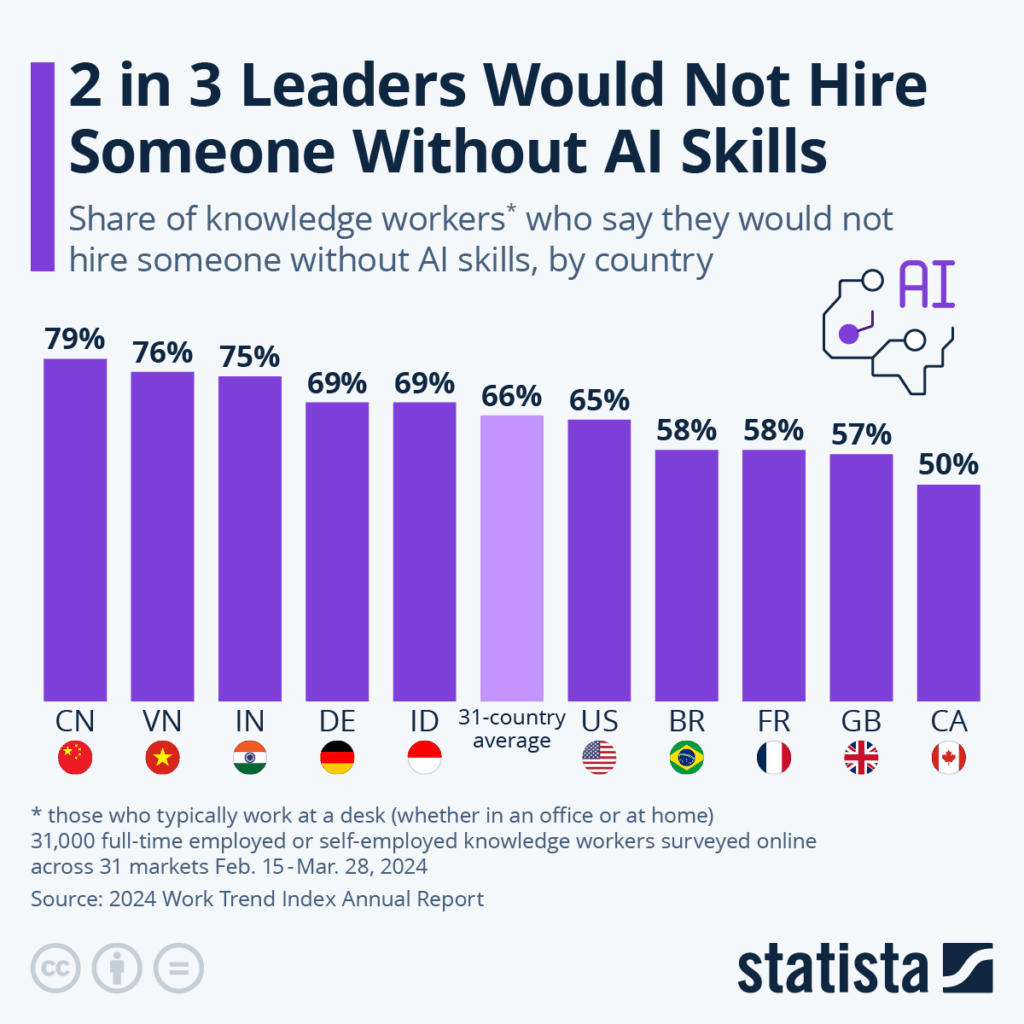
According to McKinsey, 78% of companies are using AI in at least one business function. Meanwhile, Big Tech is poised to drop over $320 billion on AI next year. That’s not a trend. That’s a business model shift. And a global-average 66% of leaders say they wouldn’t even hire someone who wasn’t proficient in using AI.
We use AI at DS, too, because it helps us move faster, test smarter, and scale what works. But speed is only valuable if you’re still steering.
The ethical risk isn’t that AI makes things too easy; it’s that it makes the wrong things feel efficient. Replicated ideas. Misaligned messaging. Work that skips the hard thinking.
We don’t use AI to skip steps. We use it to spend more time on the steps that matter.
I sat down with a few folks across our teams to get specific about the tools we’re using, the ones we’ve scrapped, and how we keep the “sense” in Designsensory with firsthand answers from:
Jessica Thompson (Media Director)
Chris Cable (VP, Creative)
Stephan Zerambo (VP, Interactive)
Hunter Foster (VP, Media + Comms)
What AI tools do you and your team use directly?
Jessica “ChatGPT. Some of our team uses it to reword clunky sentences or proof short blocks of copy—just as a second set of eyes, not the lead author. It’s helpful for making sure a paragraph holds up or flows the way we want.”
Chris “We use a handful of tools to speed up concepting and kill busywork.”
ChatGPT / Gemini – For brainstorming, writing drafts, tone/voice calibration
DALL·E / Midjourney – For early-stage visual concepts and moodboards
“Right now, we’re experimenting with Sora for video comps. Still unpredictable, but interesting.”
“The throughline is speed. These tools help us skip the friction and get to the good stuff.”
Stephan “On the interactive team, ChatGPT’s a go-to for dev help. Think: debugging, quick code stubs, ‘What’s causing this React hydration issue?’ Copilot helps generate test cases, scaffold components, even translate data formats. It’s not perfect, but it gets us 90% of the way, which saves a ton of time.”
Sentry flags bugs and suggests likely root causes
Gemini is creeping into Google Workspace for quick replies, summaries, and content blocks
Jasper + Grammarly help with quick content edits outside of dev
What tools have AI baked in—even if you’re not prompting it directly?
Even if you’re not directly asking something like ChatGPT to write stuff, it turns out AI is way more mixed into our everyday tech than most people realize.
Jessica “Meta has AI that can auto-generate ad versions by swapping creative elements, but we don’t use it much. We want more control.”
Chris “Figma’s starting to roll out AI features like wireframe generation and copy suggestions. Haven’t gone deep yet, but it’s promising. And Adobe Creative Suite is full of Firefly integrations now; it’s low-key making everything faster.”
Stephan “GA4 surfaces trends. WordPress and HubSpot suggest AI-powered content ideas. Figma’s getting smarter. These invisible upgrades aren’t game-changing individually, but they’re stacking up to improve efficiency.”
Any tools you’re watching that could shift how your team works?
Jessica “Copy.ai could be huge for paid search. We need dozens of headlines and descriptions quickly. It could cut down manual writing time big time.”
Chris
Artlist.io for AI voiceover—great when we need quick-turn video
Kaiber / Pika / Wonder Studio for faster motion design workflows
“We’re watching Sora for campaign storyboarding, but it’s not there yet.”
Stephan
Maze / PlaybookUX: AI-powered user testing
ElevenLabs: Synthesized voice for accessibility prototypes
“Some tools are starting to make stack-aware dev suggestions, not just snippets. That’s big.”
Where does AI still fall short?
Jessica “It can’t own anything. It’s helpful at the start or middle of a task, but it’s not built for the finish line.”
Chris “It doesn’t understand timing, taste, or tone. It can’t feel the nuance in a brand’s voice. And clients aren’t prompts, they’re people. AI doesn’t read the room.”
Stephan “AI outputs aren’t production-ready. Code still needs validation. Brand still needs consistency. Strategy still needs a brain. We don’t let tools do the work of thinking.”
Excitements and hesitations?
Jessica “Excited about how it could streamline media processes. Cautious about job impacts. Automation cuts steps, but it can also cut people.”
Chris “It’s a creative accelerator. We’re faster, more personalized, and more experimental. But if everyone uses the same tools the same way, we risk sameness. Our edge comes from how we use it, not that we use it.”
Stephan “Excited to spend less time on repetitive dev work. Concerned about overtrusting outputs that ‘feel’ right but aren’t. And yes, we’re watching ethical concerns and data handling closely, especially in client work.”
Bonus: Hunter on AI in Social
Hunter Foster “Sora’s great for fast social content; it lets us skip steps without losing sharpness. Claid.ai handles visual placement with precision, and Premiere Pro’s generative tools like Remix and Extend have totally changed how we edit. The AI built into Meta and Google Ads is powerful, but we use it selectively. We want to steer the strategy ourselves.”
What This Means for You
AI isn’t here to replace us. It’s here to pressure-test us. To force better questions, sharper thinking, and more responsible output.
We use AI to make the work faster, not cheaper. Smarter,not soulless. It’s a tool, not a substitute. And we hold it to the same standard we hold ourselves: it has to serve the strategy, not distract from it.
The ethical line isn’t whether you use AI. It’s how. Are you chasing shortcuts? Or are you clearing space to go deeper?
At DS, we’re not just keeping pace. We’re making sure every prompt, every output, and every idea still leads somewhere original.
If you’re figuring out where AI fits in your brand’s process, let’s talk about what better looks like.
Tired of the text on your reel clipping into Instagram’s UI? How about when you share multiple photos on Facebook and you can never get the preview just right? Oh, and don’t get me started on cover photos across different devices. Each social media platform has its own nuances and specifications for image sizes and formats. And when you’re creating content for use on multiple platforms, it’s important to understand these specifications to ensure higher utility, less production time, and better social performance.
Safe zones are like designated VIP areas on social media platforms where your text, graphics, and other content can strut their stuff without getting cut off or overshadowed by pesky elements like share buttons or auto-cropped previews. These zones are as unique as the platforms themselves, varying across post types, platforms and devices.
In today’s competitive social scene, where your creative elements land can make or break their performance. Platforms like Facebook, Instagram, and TikTok have their own rulebooks for safe zones, ensuring a seamless user experience. But it’s not just about playing by the rules; it’s about optimizing your content for maximum impact.
By respecting these safe zones, you’re not just following trends—you’re creating content that captivates your audience’s attention, ensuring that their focus is squarely on your message. So, let’s dive into the creative placements on each platform and make sure your content is stealing the spotlight!
Facebook
Facebook is by far one of the most versatile platforms and supports various types of content, including images, videos, and text posts. Properly formatting images for Facebook is like giving your content a spa day—it ensures they appear crystal clear and eye-catching in users’ feeds. And you know what that means? Increased engagement and brand visibility, baby! So, let’s make sure your Facebook game is strong and your content is popping off the screen!
Profile Photo
Aspect Ratio: 1:1 with circular safe zone
Minimum Image Size: 180 x 180 pixels
Recommended Image Size: 1080 x 1080 pixels
Actual size used depends on device and usage:
Desktop: 176 x 176
Smartphone: 196 x 196
Thumbnail: 32 x 32
Recommended File Type: JPG, PNG
The profile picture is located 16 pixels from the left and 176 pixels from the top of your cover photo (on desktop). This is important if you want to create an integrated profile picture/cover photo.
Safe Zone Note: When designing your cover photo, place all critical text and graphics in the central area of the image. The top and bottom will be cropped on mobile devices, and the sides will be cropped on desktop. The 1640 x 720 pixel size ensures that your image looks good on both.
Single Image:
There are 3 main photo ratios for Facebook photos:
Aspect Ratio:
Square: 1:1
Portrait: 4:5
Landscape: 1.91:1
Recommended Image Size:
Square: 1080 x 1080 pixels
Portrait: 1080 x 1350 pixels
Landscape: 1200 x 627 pixels
Maximum File Size: 8MB
Recommended File Type: JPG, PNG
Multiple Images:
The same specifications as single images apply for multiple images. However, each collection of photos shared on Facebook has a unique preview (and safe zone) dependant upon the aspect ratio of the images and the quantity.
Square Images:
One image: 1:1
Two images: Two 1:1 placed side-by-side
Three images: 2:1 on top of two 1:1
Four images: 1:1 in a grid
Five images: Two 1:1 images on top of three 1:1
Six or more images: The same as five images, but the bottom right photo has an overlay displaying the number of additional images.
Portrait Images:
One image: 4:5
Two images: Two 1:2 placed side-by-side
Three images: 2:1 left of two stacked 4:5
Four images: 2:1 left of three stacked 4:5
Five images: Two 1:1 images on top of, three 1:1
Six or more images: The same as five images, but the bottom right photo has an overlay displaying the number of additional images.
Landscape Images:
One image: 1.9:1
Two images: Two 1.9:1 images stacked
Three images: 3:2 on top of two 1.9:1 side-by-side
Four images: 3:2 on top of three 1:1 side-by-side
Five images: Two stacked 1:1 images left of three stacked 3:2
Six or more images: The same as five images, but the bottom right photo has an overlay displaying the number of additional images.
Note: There is an 80 photo limit on each post, but you can create and album to raise that maximum to 1,000.
Link Preview
When sharing a link post on Facebook, a photo will auto populate from the website. Create images for your web page that are at least 1200 x 630 pixels for the best display on high resolution devices.
Instagram
Thankfully, Instagram is similar to Facebook in relation to images, stories and reels. But here’s the magic: Instagram’s aesthetic game is on another level. Properly formatting images here isn’t just about getting it right; it’s about maintaining a feed that’s so cohesive and attractive that it’s like catnip for followers.
Why does this matter? Because a killer feed doesn’t just attract eyeballs—it keeps them glued, boosting your engagement and turning casual scrollers into loyal fans. So, let’s turn your Instagram feed into a work of art that’ll have everyone hitting that follow button!
Profile Picture
Recommended Aspect Ratio: 1:1 with circular safe zone
Recommended Image Size: 320 x 320 pixels, display: 110 x 110 pixels
Recommended File Type: JPG, PNG
Image Posts
Similar to Facebook, there are 3 main photo ratios for Instagram photos.
Aspect Ratio:
Square: 1:1
Portrait: 4:5
Landscape: 1.91:1
Recommended Image Size:
Square: 1080 x 1080 pixels
Portrait: 1080 x 1350 pixels
Landscape: 1080 x 566 pixels
Maximum File Size: 30MB
Recommended File Type: JPG, PNG
When posting a carousel with additional images, Instagram will auto-crop to a square or the first image’s aspect ratio. Ensure all subsequent images have a consistent orientation to avoid awkward cropping.
Note: The iconic square profile grid has been replaced by a new, taller grid that previews all posts in a 3:4 aspect ratio. For this reason, the recommended size for all new content is the 4:5 portrait (1080 x 1350 px). While you can still upload 1:1 square or 1.91:1 landscape images, they will be center-cropped to fit the new 3:4 grid, which may affect their appearance. To ensure your content looks its best, always place critical text and visual elements within the center of the image to accommodate both the new grid and the feed view.
Reels:
Aspect Ratio:
Full-Screen: 9:16
Instagram Feed: 4:5 (slight punch-in)
Recommended Size: 1080 x 1920 pixels
Video Duration:
In-Platform: 15-90 seconds
With Scheduling Tools: 3 seconds – 15 minutes
Video Format: MP4 (recommended) or MOV
Maximum File Size: 650MB for videos less than 10 minutes
Additional Technical Specifications:
Reels should have a minimum frame rate of 30 FPS (frames per second) and a minimum resolution of 720 pixels
Pro Tip: Enable high-quality uploads in your Account settings
Stories:
Aspect Ratio: 9:16
Recommended Image/Video Size: 1080 x 1920 pixels
Maximum File Size:
Image: 30MB
Video: 4GB
Recommended File Type:
Image: JPG and PNG
Video: MP4 (recommended) or MOV
TikTok
When it comes to TikTok, the main event is, without a doubt, the videos. With its interface and platform size requirements similar to Instagram’s, TikTok is a playground for your creativity.
But here’s the deal: just like any good show, your videos need to stay within the safe zone. This ensures they look their best and grab attention in the fast-paced TikTok world. So, let’s make sure your TikTok videos are primed for the spotlight, ready to dazzle viewers and maybe even go viral!
Profile Picture
Aspect Ratio: 1:1 with circular safe zone
Minimum Image Size: 200 × 200 pixels
Recommended Image Size: 1000 x 1000 pixels
Recommended File Type: JPG, PNG
Videos/Photos
Aspect Ratio: 9:16
Recommended Size: 1080 x 1920
Max File Size:
72MB (Android users)
287.6MB (iOS users)
Note: Scheduling tools may allow up to 1GB
Recommended File Type:
Video: MP4 or MOV
Image: JPG, PNG
Video Length:
Up to 10 minutes recorded in-app
Notes: Scheduling tools may allow up to 60 minutes.
Frame Rate: 23-60 FPS
LinkedIn
The digital stage where professionals shine. On LinkedIn, visuals are your secret weapon for showcasing your brand, achievements and thinking in the best light possible.
Given LinkedIn’s high level of professionalism, it’s crucial to ensure that your images and graphics are not just high-quality but also properly formatted. Why? Because every pixel counts when you’re making a positive impression on potential clients, partners, employees or employers.
So, let’s make sure your LinkedIn game is strong, your visuals are top-notch and your professional brand is standing out for all the right reasons!
Profile Picture
Minimum Image Size: 268 x 268 pixels
Recommended Image Size: 1000 x 1000 pixels
Maximum File Size: 3MB
Recommended File Type: JPG, PNG
Cover Photo
Recommended Image Size: 1584 x 396 pixels
Maximum File Size: 3MB
Recommended File Type: JPG, PNG
Safe Zone Note: The left side of your cover photo will be covered by your profile picture. On mobile, 50% of your profile picture will overlap with the cover photo.
Single Image Posts
Aspect Ratio:
Square: 1:1
Portrait: 4:5
Landscape: 1.91:1
Recommended Image Size:
Square: 1080 x 1080 pixels
Portrait: 1080 x 1350 pixels
Landscape: 1200 x 627 pixels
Maximum File Size: 3MB
Recommended File Type: JPG, PNG
Multiple Image Posts
LinkedIn’s Help Center outlines the following specifications for image posts featuring multiple images.
Images will render a max ratio of 4:5 and the post will have a greater visual emphasis on the first image.
The layout of these posts will depend on the height and orientation of the first image uploaded.
Posts with two images will appear side by side and will retain their aspect ratios.
When posts contain three or more images, the way they appear depends on the height and orientation of the first image.
You can add a max of 20 photos in a multi-photo post.
If the first image is square, it will be shown in the left column, with the other images stacked vertically to the right of the first image.
If the first image is a portrait, it will be shown in the left column, with the other images stacked vertically to the right of the first image.
If the first image is landscape, it will be shown at the top, with the other images displayed side-by-side below the first image.
X
On X, every character counts (unless you’re a Premium member, that is), but visuals can speak volumes.
X’s fast-paced, concise nature means that visuals are key to grabbing users’ attention in the blink of an eye. Properly formatted images on Twitter can make your posts stand out in the sea of posts, increasing the likelihood of reposts and engagement.
Profile Picture
Recommended Aspect Ratio: 1:1, 4:5 with circular safe zone
Recommended Image Size: 400 × 400 pixels
Maximum File Size: 5MB
Recommended File Type: JPG, PNG
Cover Photo
Recommended image size: 1500 x 500 pixels
Maximum file size: 5MB
Recommended File Type: JPG, PNG
Single Images
Aspect Ratio:
Square: 1:1
Portrait: 4:5
Landscape: 1.91:1
Recommended Image Size:
Square: 1080 x 1080 pixels
Portrait: 1080 x 1350 pixels
Landscape: 1200 x 627 pixels
Minimum Image Size: 600 x 335 pixels
Maximum Number of Images: 4
Maximum File Size: 8MB
Recommended File Type: JPG, PNG, GIF
Multiple Images
Similar to Facebook and LinkedIn, it can be tricky to remember how each image will be previewed in various quantity combinations and, if you want a holistic view without scrollers needing to click in, what those exact previews are.
Two Images: 7:8 side-by-side
Three Images: 7:8 image left of two 7:4 stacked
Four Images: 2:1 grid
To Sum It Up
In the world of social media, the way you format your images is more than just a pretty picture—it’s a strategic move to ensure your content gets noticed and resonates with your audience. By understanding and following these specifications, you can boost your social media presence and make your content shine in the vast digital landscape.
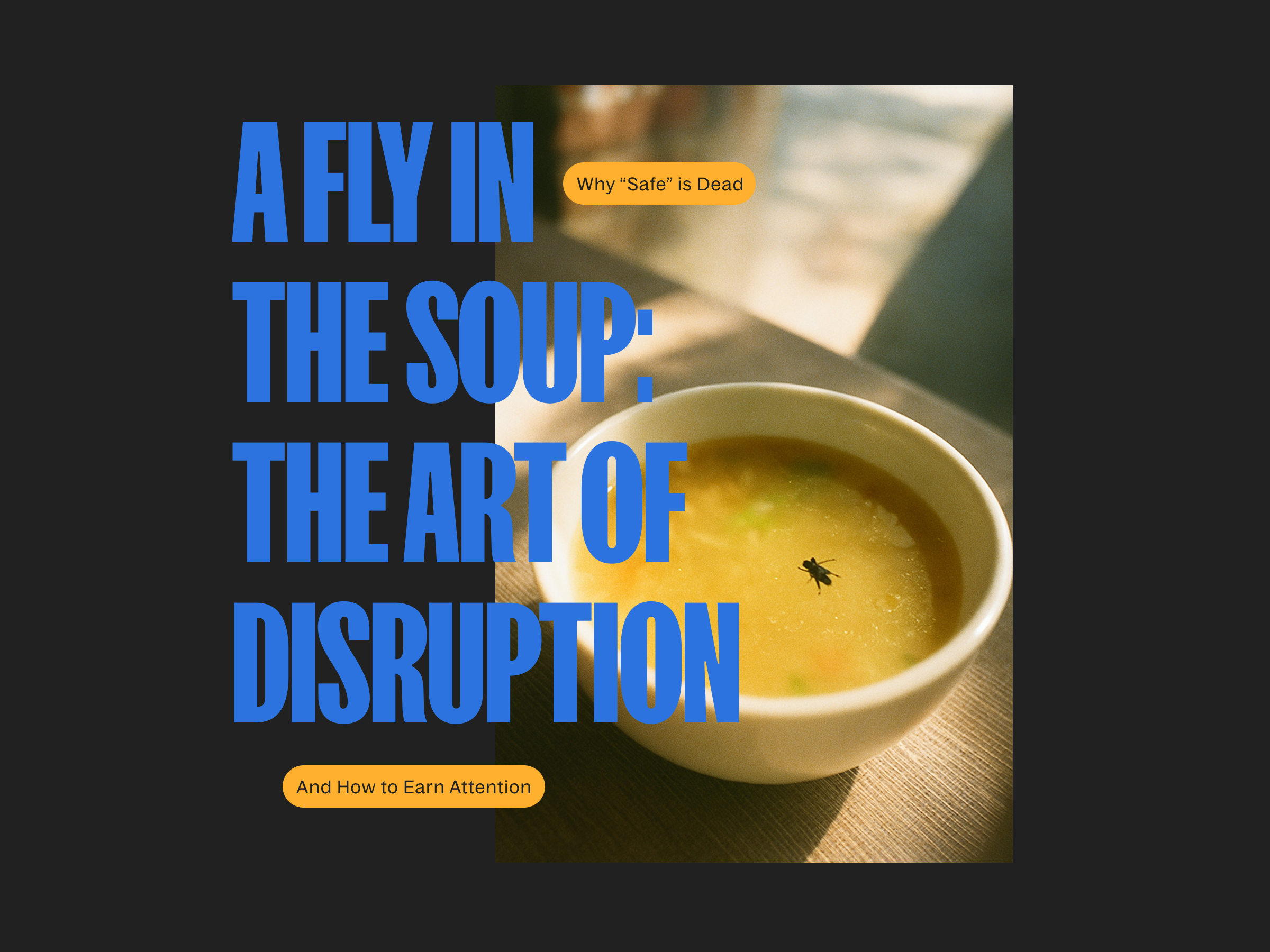
There’s something so wonderfully disruptive about the age-old idiom “a fly in the soup.”
Why? It’s not just simply because the meal is ruined. No… It’s the story. It’s the moment. And while every other bowl vanishes in conformity, our soup makes a scene. In a world of polished perfection, it reminds us that something unexpected can still happen.
Brands, take note.Conflict isn’t a catastrophe. It’s the beginning of a story.
These days, audiences are not seeking polish. We don’t care about purpose. Give us presence.
In an age of overstimulated scrolling, attention isn’t just a commodity—it’s the whole damn economy. Being seen, remembered, talked about… that’s the mission. That’s the quest.
Because here’s the truth: your audience owes you nothing. No loyalty. No eyeballs. No clicks. If your message doesn’t arrest their dopamine-depleted brains in under two seconds, it doesn’t matter how noble your purpose is or how sustainable your packaging may be.
We live in the golden age of distraction. TikTok chefs pull more viewers than broadcast networks. Cartoon mascots trend harder than Oscar winners. And somewhere, a man livestreaming clipping his toenails has a bigger audience than the entirety of your last campaign.
To be ignored is the default. To be memorable is divine.
To truly ascend—to become what we’ll call a branding god—you have to be more than visible. You have to be irresistible.
But most gods are boring.
The God of Strategy, a rigid deity, all metrics and no mood. The Goddess of Synergy, humming softly in corporate sans serif. The Sacred Duo of Budget Spreadsheet and ROI, whispering from behind the legal table. A divine yawn.
Keep your day job, Odin. Nobody gives eye contact to Hermes. I don’t want to be Apollo. I want to be Loki.
The trickster. The chaos agent. The one who tosses the fly into the soup, then waits to see who screams and who laughs. Because that, dear reader, is what gets remembered. That’s what gets shared.
Everything Is Entertainment
In 1985, ABC, CBS, and NBC had a 70% share of TV viewership. Today, that’s barely 30%. The top MrBeast video makes SNL look like a high school talent show. A Duolingo owl flirts with Dua Lipa on TikTok and hijacks Super Bowl conversations.
This isn’t about being “fun.” It’s about being entertaining. There’s a difference.
A fun brand might drop a meme now and then. But… An entertaining brand creates culture. It shows up as a character, builds worlds, tells stories that ripple outward across platforms and group chats.
The data backs this up. According to the Entertainment Index, the top 30 most entertaining brands on earth aren’t just viral—they’re profitable. 67% reported double-digit growth. Nearly all of them saw revenue increases. Not because they’re “cool,” not because they “caught a trendy vibe” … but because they understood something most brands have forgotten:
There are no categories anymore. No industry lines. Just the great screaming maw of culture devouring content 24/7. And brands? They’re snacks.
Most of you are in denial. You think you’re building brands. You’re not. You’re auditioning. In a multi-billion-dollar talent show with a million distracted judges. And they swipe with impunity.
Duolingo doesn’t have a brand. It has a sentient, slightly unhinged owl with a TikTok problem. Liquid Death sells canned water… Canned water! But, by the gods, these storytellers have become the face of disruptive, entertaining marketing.
Characters. Narratives. Universes. Not logos. But… mythologies.
Every touchpoint is another page in the story. Every merch drop, another prop in the play. Every comment section, another line of dialogue in an ongoing improv performance.
And these stories don’t require love. They require attention. The data showed that the top brands didn’t even score highest in trust or memory. They scored in humor, social shareability, shock, and character.
In other words: Stop trying to be liked. Start being watched.
Hire the Freaks, Find the Fire
You can’t create this kind of fire with stock assets and a whiteboard.
To be entertaining, you need un-standard talent. Bartenders. Dungeon Masters. People who juggle for fun. YouTubers. Failed comedians (this one hits close to home lol!). Creatives who’ve lived inside the feedback loop of an audience’s attention, not just watched a webinar about it.
And increasingly, brands are letting them lead. Doritos gave the Super Bowl keys to a couple of unknown content creators and got one of the best-performing chip ads in seven years. Duolingo’s TikTok reign was architected by a fresh-out-of-college Gen Z’er who turned a green owl into a national icon.
Entertainment doesn’t start with strategy. It starts with guts.
The Gospel of In-House Hollywood
And now, the good news.
Some of us have seen the light. And we’re building churches—not for conversion, but for creation. We call it: In-House Hollywood.
Designsensory doesn’t have departments. We have writers’ rooms. Our briefs don’t read like project charters. They read like pilots. Series arcs. Plot twists. Our productions don’t feel like ads—they feel like episodes. Like sketch comedy. Like something you’d actually watch on purpose.
We don’t pitch “deliverables.” We preach the gospel of earned attention.
The brands that embrace this model are the ones turning marketing from background noise into bingeable narratives. They’re not buying space in culture. They’re making it. Owning it. Becoming it.
Because when you treat every campaign like a cold open, every product like a prop, and every post like a punchline—the audience comes back. They subscribe. They share the sermon.
So yes, be the fly in the soup, the pickle in the punchbowl, the sock in the salad. Be the thing people remember, even if it unsettles the palate. Be weird. Be risky. Be wildly, wonderfully entertaining.
Because in this pantheon of branding gods, safe is dead. And the trickster is king.
The Future of Travel Isn’t a Return—It’s a Redesign
The global travel industry isn’t just rebounding—it’s recalibrating. Powered by pent-up demand and shaped by new expectations, travel in 2025 looks very different than it did just a few years ago.
Our research arm, Designsensory Intelligence, dug into the data. The result: a sharp, no-spin look at where travel is headed next.
Key shifts we uncovered:
The money’s moving. Travel and tourism pumped $2.36T into the U.S. economy in 2023. Global jobs in the sector will hit 449M by 2034.
Online is everything. 75% of bookings will be digital by 2029. Mobile isn’t an option—it’s the default.
Experience over amenities. Travelers want culture, sustainability, and personalized planning. Hotels still lead, but vacation rentals, camping, and cruises are closing the gap fast.
Bleisure is the new business class. 66% of corporate travelers are extending work trips for leisure—and 80% say it helps their life, period.
Gen Z + Millennials are in charge. They travel more often, spend more intentionally, and expect brands to meet them where they are—digitally and culturally.
And in the U.S.? Florida, New York, and California still draw the biggest crowds—but infrastructure gaps, visa hurdles, and overreliance on legacy experiences are dragging down growth potential.
The takeaway: If you’re still selling travel like it’s 2019, you’re not just behind—you’re invisible.
Want the full breakdown? Download the full 2025 Travel + Tourism Report for deeper insights, sharper data, and smarter next steps.
CinemaCon isn’t just an industry reunion. It’s a litmus test for who actually understands the future of theatrical marketing. I saw that firsthand last week at Caesar’s Palace, surrounded by studio executives, producers, theater owners, marketers, tech innovators—and yes, stars.
Studios brought out heavy hitters like DiCaprio, Cruise, Sweeney, De Armas, Grande, The Weeknd. The goal was obvious: remind us what theaters can do that streaming never will.
The problem? The industry is still clinging to outdated marketing playbooks.
A Locked Room Doesn’t Sell a Global Experience
We previewed trailers for Wicked: For Good, F1, Jurassic World Rebirth, Superman, The Bride, and more. But outside of Disney, no studio allowed footage, photos or any form of sharing.
Theaters need buzz, and buzz doesn’t happen in a vacuum.
If you want fans to care, you have to let them in. You have to let them feel like part of the moment—not just consumers at the end of a long production cycle. If the hype never leaves the room, the marketing momentum never starts, even if you are getting industry folks up-to-date.
Using Our Time Wisely
The push for longer theatrical windows—45 to 60 days before streaming—is a win. That’s not just a scheduling change—it’s a strategic gift. More time means more story arcs, more audience touchpoints, and more chances to move the needle. This longer runway allows campaigns to evolve, build anticipation, and generate repeat visits—not just opening weekend buzz.
And now, the stakes are even higher. With China–which has oscillated between number one and two on the world’s largest film territories in the last 5 years–threatening to block U.S. film releases amid rising tariffs, domestic performance matters more than ever. Theaters and studios alike can’t afford to leave momentum on the table.
This moment demands more than tradition. It demands:
Prioritizing experience over ad volume
Launching original, fan-first content
Creating emotional buy-in before release day
It also means thinking beyond just what we’re showing to when and to whom. Theaters can’t just stack blockbusters and hope for the best. Scheduling has to align with real life.
For example, don’t feature Moana 2 at 10:15 p.m. on a school night.
Family-friendly films need accessible time slots. Diverse genres–action, drama, comedy, horror–need intentional rollout strategies based on audience behavior. What matters isn’t just what you’re marketing. It’s who you’re talking to, and how deeply you know them.
We’ve Already Done This. And It Worked.
Since partnering with Regal Cinemas, Designsensory has proven that when you get the strategy right, fans don’t just show up—they stay loyal.
1. We Rebuilt Their Social Strategy Around the Fans
We overhauled Regal’s social media to speak to movie lovers, not just about movies. We started by auditing performance, analyzing data from a full year, and using Mosaic profiling to better understand how Regal’s audience behaves and what they care about.
2. We Created an Original Series That Built Loyalty
The Prop Shop turned one of Regal’s own employees–prop maker Jonathan Douglas–into a fan-favorite host. We gave viewers more than behind-the-scenes footage. We gave them a how-to experience that made the magic tangible.
3. We Dominated TikTok on Day One
Knowing Gen Z’s behavior (and knowing TikTok isn’t Instagram), we developed a dedicated TikTok launch that prioritized authenticity and humor. No recycled trailers. No tone-deaf stunts.
We dropped funny moments, featured upcoming merchandise and promos, joined native-first trends, launched influencer campaigns and stayed relentlessly consistent.
4. We Turned Releases Into Real-Life Experiences
We helped both Regal and Marcus Theatres take the fan experience offline and into theaters—where it belongs. From nationwide Mario Day theater takeovers to early screenings hosted by cosplayers and creators, we turned premieres into participatory events.
Bringing People Back to the Box Office
If you want to bring people back to the box office, stop waiting for the comeback. Build it.
Extend the timeline. Don’t burn all your buzz in 30 days.
Give fans something to do—not just something to see.
Build communities, not campaigns.
Tap nostalgia, but always offer something new.
Invest in content that feels alive—because your audience is.
CinemaCon reminded me how powerful the theater experience can be. But it also made one thing clear—too many brands are relying on spectacle instead of intentional strategy.
At Designsensory, we know how to make brand experiences feel personal again. We’ve done it with Regal. We can do it for you.
Web development often feels like an entirely different language. Whether you’re a client trying to understand a project, a new developer finding your footing, or someone curious about how the digital world works, learning these terms can bridge the gap between confusion and clarity.
In this post, we’ll define 20 essential terms that every web development enthusiast or professional should know. Consider this glossary your go-to resource for demystifying the jargon of our industry.
The Terms You Need to Know
1. API (Application Programming Interface)
An API is a set of rules that allows different software applications to communicate with each other. For example, APIs enable websites to pull in data from other sources, like embedding Google Maps into a contact page.
2. Responsive Design
This is the practice of designing websites to adapt to various screen sizes and devices, ensuring an optimal user experience whether you’re on a smartphone, tablet, or desktop.
3. SEO (Search Engine Optimization)
SEO refers to the techniques used to improve a website’s visibility in search engine results. From keyword optimization to site speed, SEO ensures that your site ranks higher and reaches more users.
4. CMS (Content Management System)
A CMS is a platform, like WordPress or Drupal, that enables users to create, edit, and manage website content without needing extensive coding knowledge.
5. Accessibility
Accessibility involves designing websites to ensure they can be used by everyone, including people with disabilities. This includes features like alt text for images, keyboard navigation, and screen reader compatibility.
6. Frontend Development
Frontend development focuses on the visual and interactive parts of a website—the side users see and engage with. It includes technologies like HTML, CSS, and JavaScript.
7. Backend Development
Backend development is the server-side of a website, where data is processed, stored, and managed. This includes working with databases, servers, and server-side programming languages like PHP or Python.
8. HTTPS (HyperText Transfer Protocol Secure)
HTTPS is a protocol for secure communication over the internet. It ensures that the data exchanged between a user’s browser and a website is encrypted and secure.
9. Cache
A cache is a temporary storage area that speeds up the loading of websites and applications by storing frequently accessed data locally on your device.
10. SSL (Secure Sockets Layer)
SSL is a security protocol that encrypts the data exchanged between a user’s browser and a website. This is what makes the little padlock icon appear in your browser’s address bar.
11. DNS (Domain Name System)
DNS translates human-friendly domain names, like designsensory.com, into IP addresses that computers use to identify each other on the internet.
12. Web Hosting
Web hosting is the service of storing website files on servers that are connected to the internet, making your site accessible to users.
13. UX/UI (User Experience/User Interface)
UX focuses on how users interact with a product and how enjoyable that experience is, while UI is about the visual elements and design that users interact with.
14. Version Control
Tools like Git allow developers to track and manage changes in code, ensuring that updates and revisions are easily accessible and manageable.
15. Open Source
Open-source software is freely available for anyone to use, modify, and distribute. Popular examples include WordPress, React, and Linux.
16. Sitemap
A sitemap is a file that provides search engines with information about the structure and content of your site, helping improve its crawlability and SEO.
17. Framework
A framework is a collection of pre-written code that provides a foundation for building software applications. Examples include Bootstrap for frontend design and Laravel for backend development.
18. Agile Development
Agile is a method of software development that emphasizes iterative progress, teamwork, and adaptability. It’s all about delivering functional pieces of a project incrementally.
19. Microservices
This architectural style structures an application as a collection of small, independent services that can be developed and deployed separately.
20. CDN (Content Delivery Network)
A CDN is a network of servers distributed across multiple locations. It delivers content to users faster by serving it from the server closest to them.
Why These Terms Matter
Understanding these key terms can help you navigate the world of web development more effectively. For clients, it means better communication and collaboration with developers. For developers, it’s about building a strong foundation of knowledge to create better, more efficient systems.
At Designsensory, we believe that empowering our clients and team members with knowledge is crucial to creating innovative, impactful digital experiences. If you have questions about any of these terms or want to learn more, don’t hesitate to reach out—we’re here to help translate the language of web development into success for your project.